Table of Content

GoldBet APK: How to Download the Latest Version for Android and Install the App

Want GoldBet on your Android phone? This guide covers everything: where to find the official APK file, how to install it step by step, what to check before downloading, and what the app actually offers once it is running.

No fluff, no pressure. Just the information you need before deciding whether this app fits your setup.

Quick snapshot:

  • App size:Roughly 15 to 47 MB depending on the build
  • Minimum Android version:5.0 (Lollipop) or higher
  • iOS access:Mobile web app through Safari (Add to Home Screen)
  • Currencies supported:INR, BDT
  • Welcome bonus:Up to +500% on first deposit (wagering conditions apply)
Goldbet heading-banner

Responsible Gambling Notice: You must be 18+ to use this platform. Gambling laws differ by jurisdiction, so verify legality in your state or country before playing. If you or someone you know struggles with gambling, please reach out to a local helpline. This article is informational only and does not constitute legal, financial, or cybersecurity advice.

What Is GoldBet APK and Why Would You Download This App

GoldBet APK is the Android installer package for the GoldBet mobile betting platform. If you are unfamiliar with the term, an APK (Android Package Kit) is simply the file format Android uses to distribute and install applications. It bundles all the code, assets, and resources the app needs to run on your device.

So why does GoldBet distribute an APK directly instead of just listing on Google Play? The short answer: real-money gambling apps face strict restrictions in official app stores. Google Play requires such apps to hold a valid licence for every country of distribution and to be individually approved. Apple's App Store enforces nearly identical rules. This means GoldBet may not appear in your region's Play Store or App Store at all.

The official site at goldbett.org remains the primary direct-download source for the GoldBet app APK.

What Is GoldBet APK and Why

"Google Play prohibits real-money gambling apps unless they are licensed and approved; approved apps must be free, without In-app Billing, and block minors." - Google Play Developer Policy, 2026.

One thing worth understanding clearly: APK files bypass the Play Store's built-in vetting process. That means you, the user, carry extra responsibility for verifying the source. We cover exactly how to do that further down in this guide.

The GoldBet mobile app is designed for two core use cases: sports betting and casino games. Whether you want to place a live cricket bet, spin slots, or play Teen Patti with a real dealer, the Android app brings those features to your phone in a format optimized for touchscreens and mobile connections.

How the GoldBet App Differs From the Mobile Website

Using GoldBet through a mobile browser works. Nobody is saying otherwise. But the dedicated app delivers some measurable advantages that matter in practice:

  • Speed. The app loads games and betting markets in roughly two seconds. Browser-based load times depend on cache, open tabs, and connection quality, so they tend to be less consistent.
  • Push notifications. Real-time alerts for live match updates, bonus drops, and cashout windows. Browser notifications exist, sure, but they are less reliable and easier to accidentally dismiss.
  • Biometric login. Fingerprint or face unlock gets you into your account instantly. No typing passwords on a small screen.
  • Offline caching. The app stores interface elements locally. Navigation stays smooth even on patchy 3G connections.
  • Full-screen experience. No browser toolbars eating up screen space. The interface is built for touch from the ground up.
  • One-tap deposits. Save your preferred payment method and fund your account with a single tap.

That said, convenience cuts both ways. Research into mobile gambling behaviour suggests that having a betting app on your home screen may increase the frequency and spontaneity of play. This makes responsible gambling tools like deposit limits, session timers, and self-exclusion options genuinely important. Look for these in the app's settings right after installation.

How the GoldBet App Differs From

A 2024 meta-analysis of 92 population-based studies found that 8.7% of adults engaged in at-risk gambling, while problematic gambling prevalence reached 15.8% (95% CI 10.7-21.6) among online casino and slot participants. - Elsevier / ScienceDirect, 2024. https://www.sciencedirect.com

What Tasks the GoldBet Android App Handles

Here is what the app provides access to once installed:

  • Sports betting with pre-match and live (in-play) markets across cricket, football, kabaddi, tennis, and more
  • Casino games including slots, crash games, and digital table games
  • Live casino with real dealers streaming in HD for blackjack, roulette, baccarat, Teen Patti, and Andar Bahar
  • Account management covering deposits, withdrawals, transaction history, and KYC verification
  • Bonus tracking so you can monitor wagering progress and promotional offers

Think of it as the full GoldBet platform compressed into a single app for your Android device.

[Comparison table placeholder: GoldBet APK vs. mobile website - installation, access speed, interface, live features, use on Android device]

The key difference in a sentence: the mobile app is designed for repeated, quick-access use, while the browser version works better as a one-off or backup option.

What Tasks the GoldBet Android App

How to Download GoldBet APK Latest Version on Android

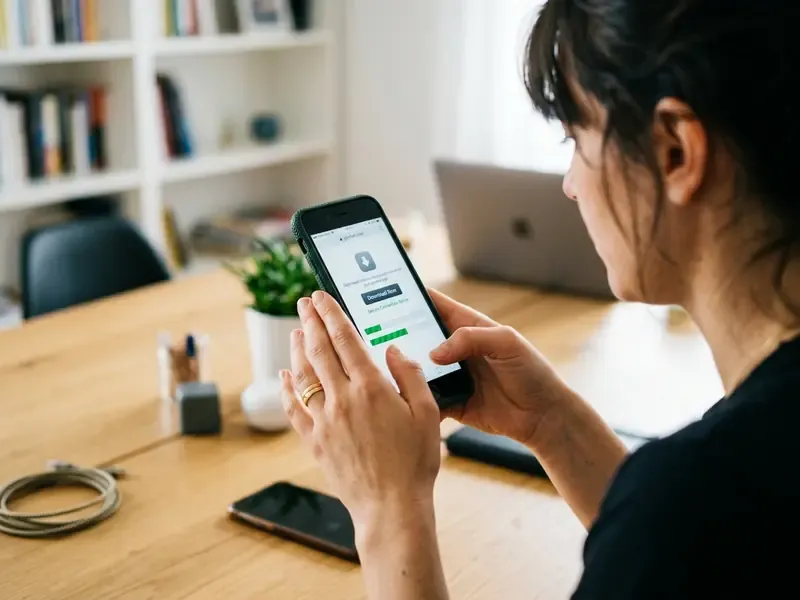
Getting the official GoldBet APK onto your device takes less than two minutes when you know the right steps. Here is the safe, verified process for the GoldBet app download for Android.

  1. Open your mobile browser (Chrome, Samsung Internet, or any browser you prefer) and go to the official GoldBet website: goldbett.org.

  2. Find the download button. Look for "Android Download" or "Download APK" in the mobile section of the site. Do not use third-party APK repositories. Seriously, just don't.

  3. Tap "Download." The APK file starts downloading to your device. Your browser may show a warning that the file "can harm your device." This is a standard Android warning for any file outside the Play Store, not a specific red flag.

  4. Open the downloaded file. Pull down your notification shade and tap the completed download. Alternatively, open your Files app and navigate to the Downloads folder.

  5. Grant installation permission (detailed in the installation section below).

  6. Install and launch. Tap "Install," wait a few seconds, then tap "Open."

"The FBI recommends downloading only verified apps from official stores, regularly updating software, and reading terms of use before installation." - FBI IC3, Public Safety Advisory. https://www.ic3.gov

What to Check Before You Download the APK

Before tapping that download button, run through this quick checklist. It takes thirty seconds and prevents most installation failures:

#ActionHow to Check
1Verify your Android versionSettings > About Phone > Android Version. You need 5.0 (Lollipop) or higher.
2Check free storageSettings > Storage. Ensure at least 150 MB free (100 MB for the app plus buffer).
3Confirm the official siteCheck the URL bar for goldbett.org and the HTTPS padlock icon.
4Ensure stable internetUse WiFi or strong 4G. A partial download can corrupt the APK file and trigger a "Parse Error."

"Kaspersky (2026) recommends avoiding APK downloads from unverified sites, preferring known app stores, and downloading APKs only from official company websites with URL verification." - Kaspersky, 2026. https://www.kaspersky.com

How to Choose the GoldBet APK Latest Version

When you visit the official site, the download button typically points to the most recent build. That is the version you want in almost every case.

But what about older versions? Some users specifically search for "goldbet apk download old version," and there are a few legitimate reasons for that. If your phone runs an older Android version (say, 5.0 or 5.1) and the latest APK requires Android 8.0+, an older build might be your only option. Devices with less than 2 GB of RAM sometimes perform better with lighter, earlier versions too.

Still, the latest version is almost always the better choice. It includes security patches, updated payment integrations, bug fixes, and new features. We will dig deeper into the old version vs. latest version question in a dedicated section below.

Pre-download checklist (quick scan version):

  1. Confirm your Android version meets the minimum requirement
  2. Free up at least 150 MB of storage
  3. Navigate to goldbett.org and locate the download button
  4. Download the GoldBet APK file on a stable connection
  5. Prepare to enable installation permissions (next section)
How to Choose the GoldBet APK

How to Install the GoldBet APK File With Unknown Sources Enabled

This is where most first-time users get stuck. Android blocks APK installations from outside the Play Store by default. You need to grant permission manually, and the process differs slightly depending on your Android version.

Where to Enable Unknown Sources on Android

For Android 8.0 and above (including Android 12, 13, 14+):

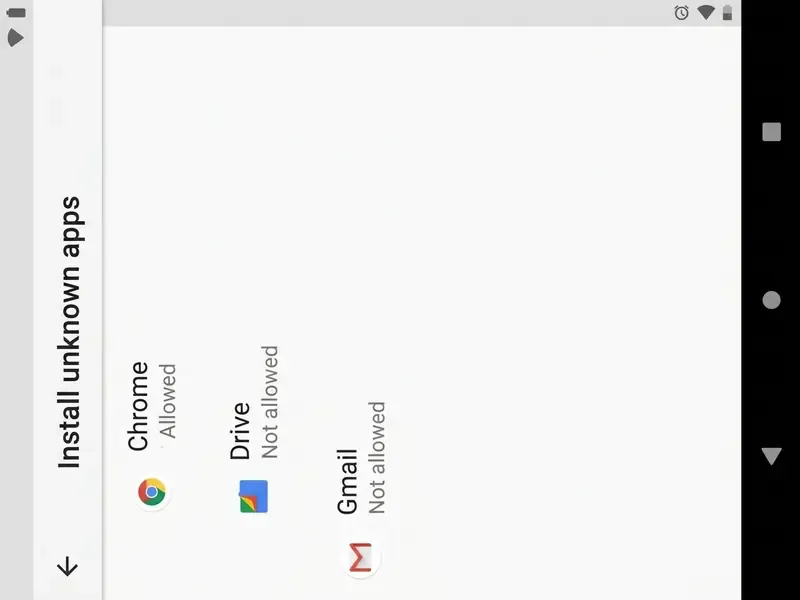
Modern Android versions do not have a single global "Unknown Sources" toggle. Instead, you grant installation permission on a per-app basis. This means you allow only your browser (for example, Chrome) to install APK files, not every app on your phone. Much safer.

  1. When the APK download finishes, Android may show a prompt: "For your security, your phone is not allowed to install unknown apps from this source." Tap "Settings" on that prompt.
  2. You will land on: Settings > Apps > Special app access > Install unknown apps > [Your Browser Name].
  3. Toggle "Allow from this source" to ON.
  4. Go back to the downloaded file and tap "Install."
  5. Wait 5 to 10 seconds. The system verifies the package and installs GoldBet.
  6. Tap "Open" to launch the app, or find the GoldBet icon on your home screen.

For Android 7.0 and below (legacy devices):

  1. Go to Settings > Security.
  2. Enable "Unknown Sources" (this is a global toggle on older versions).
  3. Open the APK file and tap Install.

Security tip: After installing GoldBet, return to Settings > Install unknown apps and turn the toggle back OFF for your browser. This prevents accidental installation of other APK files later.

Where to Enable Unknown Sources on

"CISA 2024 recommends enabling Google Play Protect, setting up Android Private DNS, and restricting app permissions through the Android privacy manager." - CISA, Mobile Communications Best Practice Guidance, 2024. https://www.cisa.gov/resources-tools/resources/mobile-communications-best-practice-guidance

What to Do If the App Will Not Install

Even when you follow every step correctly, things can go wrong. Here are the most common errors and their fixes:

"Parse Error" (There Was a Problem Parsing the Package)

This usually means a corrupted download or an APK that is incompatible with your Android version. Delete the downloaded file, reconnect to stable WiFi, and re-download from goldbett.org. If possible, compare the file size of your download against the size listed on the official site. A mismatch points to corruption.

"App Not Installed"

A previous version of GoldBet with a different signature may already be on your device, or you might not have enough storage. Uninstall the existing GoldBet app (Settings > Apps > GoldBet > Uninstall), restart your device, and re-install from the fresh APK.

"Package Conflict" (Conflicting Package)

The signing certificate of the new APK does not match the one already installed. This typically happens when you previously installed GoldBet from a different source. Uninstall the old version completely, then install the new one.

"Insufficient Storage"

You need at least 100 to 150 MB free. Clear cache (Settings > Storage > Cached Data > Clear), delete unused apps, or move photos and videos to cloud storage. Aim for 500 MB free for smooth installation and operation.

What to Do If the App

Important: Installing APK files from unverified sources carries real risks, including malware, data harvesting, and compromised credentials. Always verify the file source, check the version, and review your device settings before proceeding with any installation. The official GoldBet website (goldbett.org) is the recommended source.

What Features Are Available in the GoldBet App After Installation

Once GoldBet is installed and running, here is what you actually get. The app is more than a shortcut to the website. It is a self-contained mobile experience with features built specifically for phone use.

Performance. The app loads games and markets in under two seconds. Locally cached assets eliminate the repeated loading that browser users deal with.

Push notifications. Instant alerts for live match updates, bonus drops, multiplier moments in crash games, and cashout reminders. You control exactly which notifications you receive in the app's settings.

Biometric login. Fingerprint or face unlock. No password typing. This matters more than you might think when placing time-sensitive live bets.

Live streaming. Watch cricket, football, and other sports directly inside the app while placing bets. No switching between apps or browser tabs.

Low data mode. Designed to work smoothly even on slower 3G connections. This is a genuinely useful feature for users across India and Bangladesh where network quality varies region by region.

Transaction tracking. View every deposit, withdrawal, bet placement, and bonus credit directly from the app. Full transparency without logging into the desktop site.

What Features Are Available in the

A 2023 review of smartphone apps for problem gambling found that apps incorporating CBT content and in-app communities scored higher on informational quality and engagement on the MARS scale. - Springer, 2023. https://link.springer.com

Sports Betting and Live Events in the App

The GoldBet app offers pre-match and live (in-play) betting across dozens of sports, with strong emphasis on markets popular in South Asia:

  • Cricket covers IPL, international Test matches, T20 leagues, BBL, and CPL. Bet on match winner, top batsman, total runs, and session markets.
  • Football includes Premier League, La Liga, Champions League, ISL, and lower divisions. Markets range from match result and over/under to both teams to score and Asian handicap.
  • Kabaddi features Pro Kabaddi League coverage with match winner and point-spread markets.
  • Tennis, basketball, volleyball, rugby, ice hockey, and horse racing round out the selection with competitive odds.

The live betting section updates odds in real time. Place bets on goals, wickets, corners, and micro-events as the action unfolds. The app's native interface keeps the cashout button responsive and lag-free. When every second counts during a live match, that responsiveness matters.

Sports Betting and Live Events in

Casino and Game Sections on Android

The GoldBet casino section on Android brings the full desktop experience to your phone.

Slots. Hundreds of titles from multiple providers, including popular games like Phoenix Rises and Leprechaun Riches. Slots automatically adapt to both vertical and horizontal screen orientation. Portrait mode works for casual play; landscape gives you the full visual experience.

Live casino with real dealers. Play blackjack, roulette, baccarat, poker, Teen Patti, and Andar Bahar with professional dealers streamed in HD. The app delivers stable video playback even on mid-range devices. Well, most of the time. Occasional buffering on very slow connections is possible, but the app handles it better than a browser would.

Crash games. Aviator and similar crash-style games are a standout category. Animations run smoothly on mobile, the cashout button is large and responsive, and the multiplier display stays visible throughout. These games are popular among Indian and Bangladeshi players for their fast-paced format.

Table games. Digital versions of roulette, blackjack, baccarat, and 3-Hand Casino Hold'em are available for players who prefer automated gameplay without waiting for a live dealer.

Casino and Game Sections on Android

GoldBet App Latest Version vs. Old Version: What to Choose

This is a question that comes up more often than you might expect. Some users specifically search for "goldbet apk download old version," and the reasons are not always obvious.

When the Latest Version Is the Better Choice

In almost every scenario, the latest version wins. Here is why:

  • Security patches. Updates close known vulnerabilities, including unencrypted HTTP traffic, SQL injection vectors, and weak cryptographic configurations. These remain top mobile app risks in 2026.
  • Third-party dependency updates. Older versions rely on outdated libraries that may contain critical CVEs (Common Vulnerabilities and Exposures).
  • New features. Improved interface, additional payment methods, new games, and better live-streaming performance.
  • Regulatory compliance. Licence conditions often require operators to run the latest approved version of their software.

If your device supports the latest build, use it. Simple as that.

When the Latest Version Is the

When Users Look for an Old Version

There are a few legitimate scenarios:

  1. Outdated OS. If your device runs Android 4.4 to 5.1 and the latest GoldBet APK requires Android 8.0+, an older version may be your only option for basic functionality.
  2. Low RAM devices. Phones with less than 2 GB of RAM sometimes perform better with older, lighter versions that skip heavy background services.
  3. Regression bugs. Occasionally, a new update introduces a bug that breaks something critical (payment processing, for instance). Rolling back to a stable version while the developer patches the issue is a pragmatic, if temporary, solution.

The honest recommendation: Always use the latest version unless your device physically cannot support it. If you must use an older version, download it from the official site only and accept the increased security risk that comes with running outdated software.

When Users Look for an Old

System Requirements and Compatibility for GoldBet App on Android

Before downloading, it helps to know whether your device can actually run the app properly. Here are the specifications:

ParameterAndroid (APK)iOS (Web App)
OS VersionAndroid 5.0+ (8.0+ recommended)iOS 11.0+
RAMMinimum 2 GBMinimum 2 GB
Free Storage100 to 150 MB100 MB
Processor1.2 GHz quad-core or higherApple A7 or higher
Internet3G+ (4G recommended for live streaming)3G+ (4G recommended)
ScreenAny resolution (responsive UI)720p+ recommended

A few notes on these numbers. The 2 GB RAM minimum is a practical floor. You can technically install the app on a 1 GB device, but performance will suffer noticeably during live casino sessions or when multiple markets are loading simultaneously.

The storage requirement (100 to 150 MB) covers the initial installation. Over time, cached data may push the app's footprint higher. Clearing cache periodically through Settings > Apps > GoldBet > Clear Cache keeps things running smoothly.

Different sources report varying file sizes for the GoldBet APK, anywhere from 15 MB to 47 MB. The discrepancy depends on the version, region, and whether the download includes additional resource packs. Check the official site for the exact size of the current build.

A few notes on these numbers

What You Need for Login, Registration, and Account Use in the App

Logging Into an Existing Account

If you already have a GoldBet account from the website, you do not need to create a new one. Your account is universal. The same credentials work on the app, mobile browser, and desktop site. Balance, active bets, and bonus status sync automatically because all platforms connect to the same backend servers.

To log in:

  • Enter your email or phone number and password, or
  • Use biometric login (fingerprint or face unlock) after enabling it in the app's settings

Place a bet on your phone, check its status on your laptop. Everything stays in sync.

Tip: Enable two-factor authentication (2FA) in your account security settings. The app supports authenticator-based 2FA via QR code. It takes sixty seconds to set up and adds a meaningful layer of protection.

Logging Into an Existing Account. If

Creating a New Account

If you are new to GoldBet, registration follows a standard flow:

  1. Open the app and tap "Register" or "Sign Up."
  2. Enter your details: email address, mobile number, full name, date of birth.
  3. Create a strong password using a mix of upper and lowercase letters, numbers, and symbols.
  4. Accept terms and conditions and confirm you are 18+.
  5. Verify your account via the link sent to your email or an SMS code sent to your phone.

What to Check Before Your First Session

After installation and login, take five minutes to configure a few things. It will save you headaches later.

System permissions. Grant location access ("While Using the App") if required for geo-verification. Allow push notifications for live bet updates and bonus alerts. Storage access helps with caching and faster load times. Only grant permissions when the app explains why it needs them. If a prompt feels unnecessary, deny it and see if core functionality is affected.

Responsible gambling tools. Navigate to your account settings and set up deposit limits (daily, weekly, monthly), session time reminders, and self-exclusion options if needed. Do this before you start playing, not after.

Payment setup. Add your preferred deposit method (UPI, Paytm, PhonePe, bKash, or others) and complete KYC verification early. GoldBet typically requires identity verification (Aadhaar, passport, or national ID) before processing your first withdrawal. Getting this done upfront avoids delays when you want to cash out.

Interface preferences. Set your preferred language, choose between light and dark mode if available, and adjust odds format (decimal, fractional, or American).


What to Check Before Your First

Disclaimer: The availability of betting and casino functionality depends on the platform's terms and your local jurisdiction's regulations. Registration requirements, deposit options, and game access may vary. Always verify the current rules on the platform itself before taking action.

Deposits, Withdrawals, and Payment Methods on the App

Managing money on the GoldBet app is straightforward. The platform supports local payment methods tailored to Indian and Bangladeshi players:

Payment MethodMin. DepositMax. DepositMin. WithdrawalProcessing Time
UPI₹500₹100,000₹500Instant to 24 hrs
Paytm₹500₹100,000₹500Instant to 24 hrs
PhonePe₹500₹100,000₹500Instant to 24 hrs
bKash৳500৳100,000৳500Instant to 24 hrs
Nagad৳500৳100,000৳500Instant to 24 hrs
Rocket৳500৳100,000৳500Instant to 24 hrs
Visa/Mastercard₹500₹100,000₹5001 to 3 business days
Neteller₹500₹100,000₹500Instant to 24 hrs
Skrill₹1,000₹100,000₹1,000Instant to 24 hrs
Bank Transfer₹1,000₹200,000₹1,0001 to 5 business days

The app remembers your preferred payment method, so future deposits become a single-tap operation. Your full transaction history, covering every deposit, withdrawal, bet, and bonus credit, is accessible from the app's account section.

A practical note on KYC: Have your government-issued ID ready before requesting your first withdrawal. Completing verification early is one of those small steps that saves real frustration later.

Bonuses and Promotions Available in the App

GoldBet offers welcome bonuses and ongoing promotions for both new and returning players:
  • Welcome Bonus:Up to +500% on your first deposit, with maximum bonus value up to INR 75,000 (or BDT equivalent).
  • Cashback:+30% cashback on qualifying losses during promotional periods.
  • Express Bonuses:+15% bonus on accumulator bets with up to 11 events.
  • Jackpots:Access to progressive jackpot pools through qualifying slot games.
  • Free Spins:Periodic free-spin offers on featured slot titles.
Bonuses and Promotions Available in the

Understanding Wagering Requirements Before You Claim

Every bonus comes with wagering requirements (also called "playthrough" or "rollover"). This means you must bet a certain multiple of your bonus amount before you can withdraw winnings earned with bonus funds.

Example: If you receive a ₹5,000 bonus with a 30x wagering requirement, you must place ₹150,000 in qualifying bets before that bonus converts to withdrawable cash. That is a significant amount. Make sure you understand the math before claiming.

Checklist before accepting any bonus:

  • Read the full terms and conditions in the app's promotions section
  • Note the wagering requirement multiplier (for example, 25x, 30x, or 40x)
  • Check the time limit (most bonuses expire within 7 to 30 days)
  • Confirm which games count toward wagering (slots usually count 100%, table games often contribute less)
  • Verify the maximum bet allowed while playing with bonus funds

A bonus looks generous on the surface. The terms determine whether it actually benefits you.

Understanding Wagering Requirements Before You Claim

How to Spot Fake GoldBet Apps and Stay Safe

Multiple counterfeit apps use the "GoldBet" name to lure unsuspecting users. This is not a theoretical risk. Here is how to protect yourself.

Red Flags

  • Paid downloads. The official GoldBet betting app is always free. If an app called "GoldBet" charges money upfront, it is not the official casino and betting platform.
  • Wrong developer name. The official app is published by GoldBet's corporate entity. Cross-reference the developer name on the download page with the official website.
  • Unusual permissions. A betting app should not need access to your contacts, call logs, or SMS messages. Excessive permission requests are a classic malware indicator.
  • Low download counts plus poor reviews. Legitimate major betting apps have tens of thousands of downloads and detailed user reviews.
  • Different package ID. Clone apps on Google Play often use package names like com.goal.sport.hero.app or com.tournament.field.force. These are completely unrelated to the official GoldBet platform.
Red Flags. - Paid downloads. The

"SANS 2023 advises checking the developer name, reading reviews, avoiding apps with excessive permissions, and deleting unused apps." - SANS Institute, How to Outwit Malicious Mobile Apps, 2023. https://www.sans.org

How to Verify Authenticity

  1. Only download from the official website (goldbett.org) or Google Play if available in your region with verified developer details.
  2. After installation, verify that the app opens the correct GoldBet platform by checking the login page URL in any in-app browser.
  3. Contact GoldBet's official customer support (available 24/7) if you have any doubts about an app's legitimacy.

The Broader Security Picture

Sideloading APKs carries inherent risks that every user should understand:

  • Malware injection. A tampered APK can contain keyloggers, banking trojans, or spyware running silently in the background.
  • Data harvesting. Unverified apps can persistently collect personal data, contacts, location, and financial information.
  • Man-in-the-middle attacks. Without proper certificate pinning, a fake app could intercept your login credentials and payment details.

"NIST catalogues threats where applications are installed without the device owner's knowledge, placing the device in a weakened security state." - NIST Mobile Threat Catalogue. https://pages.nist.gov/mobile-threat-catalogue/

Your defence checklist:

  1. Download only from goldbett.org or Google Play. Bookmark the official URL.
  2. Enable Google Play Protect: Settings > Security > Google Play Protect > Turn on.
  3. Scan the APK before installing using VirusTotal (virustotal.com) or a reputable mobile antivirus.
  4. Review permissions after installation: Settings > Apps > GoldBet > Permissions. Revoke anything unnecessary.
  5. Keep your OS updated. Android security patches close vulnerabilities that malware exploits.
  6. Use a VPN on public WiFi when accessing your betting account.

Disclaimer: This information is general in nature and does not replace consultation with a cybersecurity specialist. Specific risks depend on your device, OS version, and the APK source.

Keeping Your GoldBet App Updated

Because the GoldBet APK is sideloaded (not from Google Play), it does not update automatically through the Play Store. Here is how to stay current:

  1. In-app notifications. When a new version is available, the GoldBet app displays an update prompt on launch. Tap it to download and install the latest build.
  2. Manual check. Periodically visit goldbett.org and compare the version number listed on the site against the version in your app (Settings > About or App Info).
  3. Reinstall process. Download the new APK, install it over the existing version (no need to uninstall unless you encounter a package conflict), and your account data and settings will be preserved.

Checking for updates at least once every two weeks is a reasonable habit. Do it sooner if you notice performance changes or if the app prompts you.

Keeping Your GoldBet App Updated. Because

The legality of online betting varies dramatically by country, state, and territory:

GoldBet may restrict registration, deposits, or game availability based on your detected location. Using a VPN to circumvent geo-restrictions may violate the platform's terms of service and local law.

FAQ on GoldBet APK, iOS, and App Download

Can You Use GoldBet APK on iOS?

No. APK is an Android-only format. The file contains code compiled for the Android Runtime using Java/Kotlin, and iOS simply cannot interpret it. iPhone users should use the mobile web app: open GoldBet in Safari, tap the Share icon, and select "Add to Home Screen." The web app supports all core features including sports betting, live casino, deposits, and withdrawals.

If you see a website offering "GoldBet APK for iOS/iPhone," it is either a scam or a fundamental misunderstanding of how mobile operating systems work. Avoid it.

Is GoldBet Available on Google Play or the App Store?

It depends on your region. Google Play and Apple's App Store only allow real-money gambling apps with valid licences for the user's country. If GoldBet is not listed in your store, the official APK download from goldbett.org is the recommended alternative for Android users. iPhone users should use the Safari-based web app method described above.

Is the GoldBet APK File Safe?

When downloaded from the official website, the APK is published by GoldBet's development team. Always verify the URL, scan the file with an antivirus tool, and check permissions after installation. Downloading from unofficial third-party sites significantly increases your risk of encountering tampered files.

How Do I Update the GoldBet App?

The app notifies you when an update is available. You can also visit the official site, download the latest APK, and install it over the existing version. Your account data and settings carry over.

What If the APK Will Not Install?

The most common fixes: re-download on stable WiFi, uninstall conflicting old versions, and ensure you have at least 150 MB of free storage. Check the troubleshooting section above for specific error messages and solutions.

Does GoldBet Support INR Deposits?

Yes. Indian players can deposit and withdraw using UPI, Paytm, PhonePe, Visa, Mastercard, Neteller, Skrill, and bank transfer, all in Indian Rupees.

Is Online Betting Legal in India?

Online gambling laws in India vary by state. There is no blanket federal ban on online betting through offshore platforms, but some states have specific restrictions. This article does not provide legal advice. Consult local legal resources for your state's current position before using any betting platform.

Do I Need to Complete KYC Before Withdrawing?

Yes. GoldBet typically requires identity verification (Aadhaar, passport, or national ID) before processing your first withdrawal. Complete KYC early to avoid cashout delays.

Last updated: July 2026. This article is periodically reviewed for accuracy. Gambling involves financial risk. Never bet more than you can afford to lose. If you need support, contact your local responsible gambling helpline.